
Free recert & license renewal tracker for Google Sheets
Updated November 2, 2026.
Here it is: a free Google Sheet for the dates that cost you money when you miss them. Carrier recerts, state license renewals, contracts that have sat too long, and an AEP prep checklist you can reuse every year. No sign-up with us, no email address. There’s an Excel version and a printable version too.
Opens in Google Sheets and asks you to make a copy. Your copy is saved in your own Google Drive, and only you can see it. You’ll need to be signed in to Google.
Don’t use Google?
What’s inside
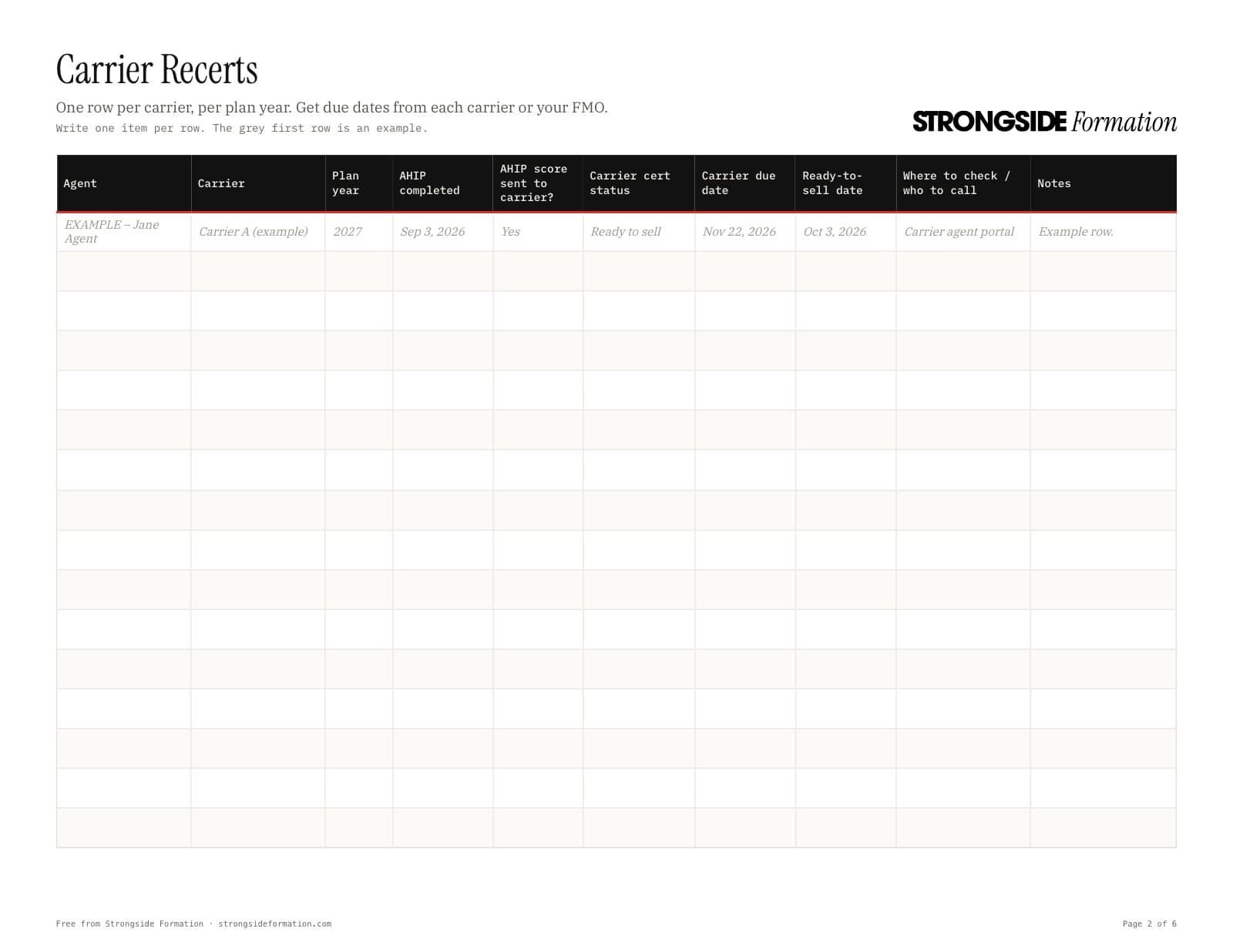
- Carrier Recerts: one row per carrier, per plan year. Track AHIP, whether the carrier got your score, your certification status and the days left before the carrier’s deadline.
- Licenses: one row per state, with the expiration date and the CE hours you still need.
- Carrier Contracts: every contract request and the date you sent it. Anything still waiting after 14 days gets flagged, so you know who to call.
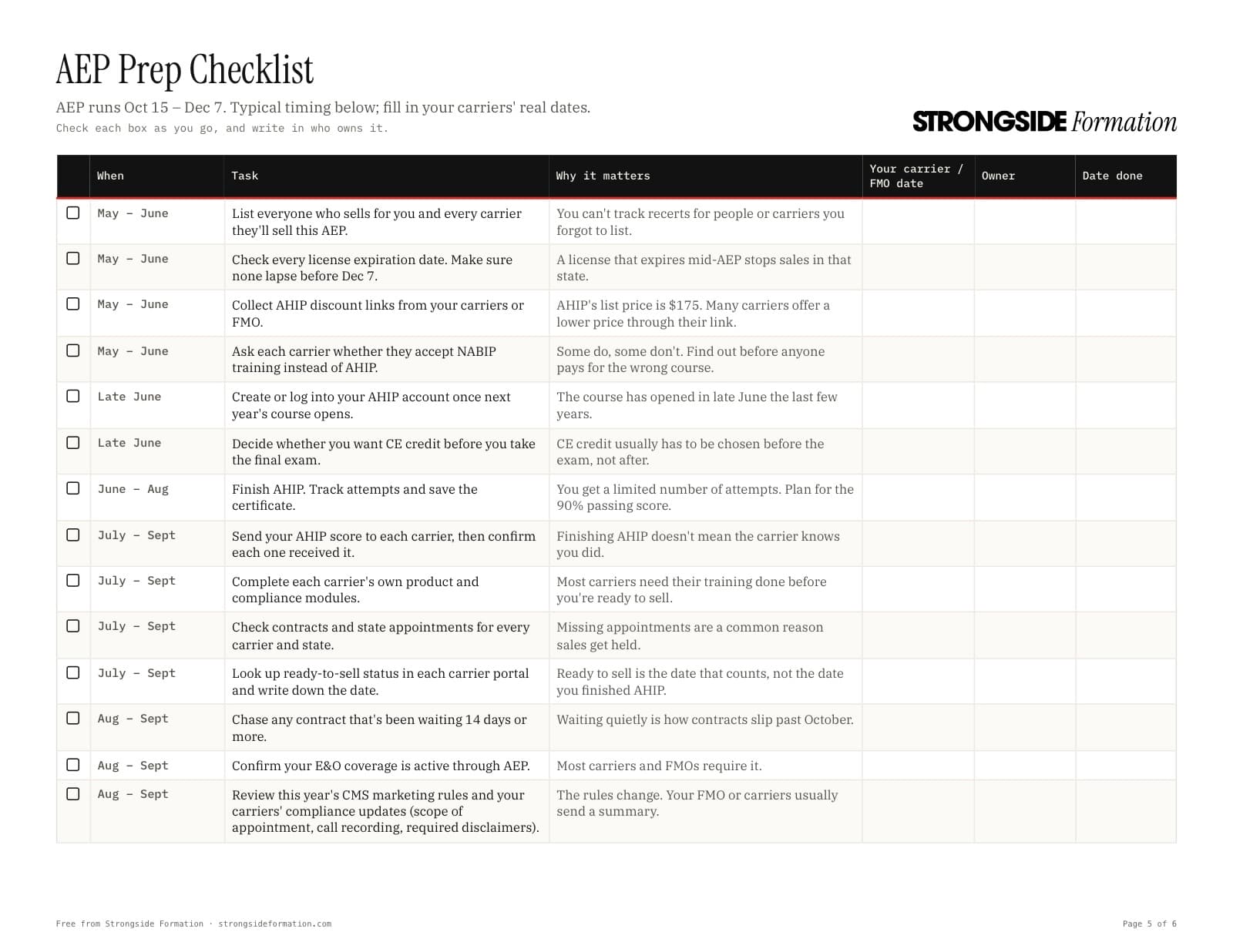
- AEP Prep Checklist: 25 steps from May through the end of AEP, with why each one matters and a column for who owns it.
How to use it
- Make your copy in Google Sheets, and click Make a copy when Google asks. Bookmark your copy so it’s easy to find on Mondays.
- Delete the grey example rows on each tab, or type over them.
- Fill in the real dates: recert deadlines from each carrier’s portal or your FMO, and license dates from your license or NIPR. Our guide to license renewal deadlines by state can help.
- Open it every Monday. Red means overdue or due soon, yellow means coming up, and green means done.
One thing to watch: finishing AHIP isn’t the same as being ready to sell. Each carrier has to receive your score, and most have their own training too. The AHIP and carrier certification guide walks through it.
When a spreadsheet stops being enough
A spreadsheet only works when someone opens it. In the middle of AEP, that’s usually the first thing to go.
That’s what Formation does differently. It tracks these same dates, checks them every morning and sends you a short email at 7:00 AM with only what needs you. It works next to the CRM you already have. If the spreadsheet is working for you, keep using it. If it isn’t, here’s what Formation does.
Questions agents ask
Is it really free?
Yes. There’s no sign-up with us and no email address. Copy it, download it and share it with your team.
How do I get it into my Google account?
Click “Make my copy in Google Sheets.” Google asks you to sign in if you aren’t already, then asks if you want to make a copy. Click Make a copy, and the tracker is saved in your own Google Drive. Nobody else can see what you type.
I don’t use Google. Can I still use it?
Yes. Download the spreadsheet for Excel or Numbers, or print the PDF and fill it in by hand.
Does it tell me my carriers’ recert deadlines?
No. Every carrier sets its own, so you fill in the due date from the carrier’s portal or your FMO. Once you do, the sheet counts the days down and colors the row as the date gets close.
Can my whole office use one copy?
Yes. Every tab has an Agent column, so one file can cover everyone who sells for you.
What’s the catch?
There isn’t one. We build Formation, an office app that tracks these same dates and sends you a 7:00 AM email with what’s due. The tracker is the do-it-yourself version, and plenty of agents will never need more than that.
This tracker is a planning tool, not legal or compliance advice. Always confirm dates with the carrier, your FMO, CMS, and your state insurance department.